
CUSTOMER ACCOUNTS
See the balance.
Understand the story.
Bring customer orders and recorded payments into one account history, with the context your team needs for a useful follow-up.
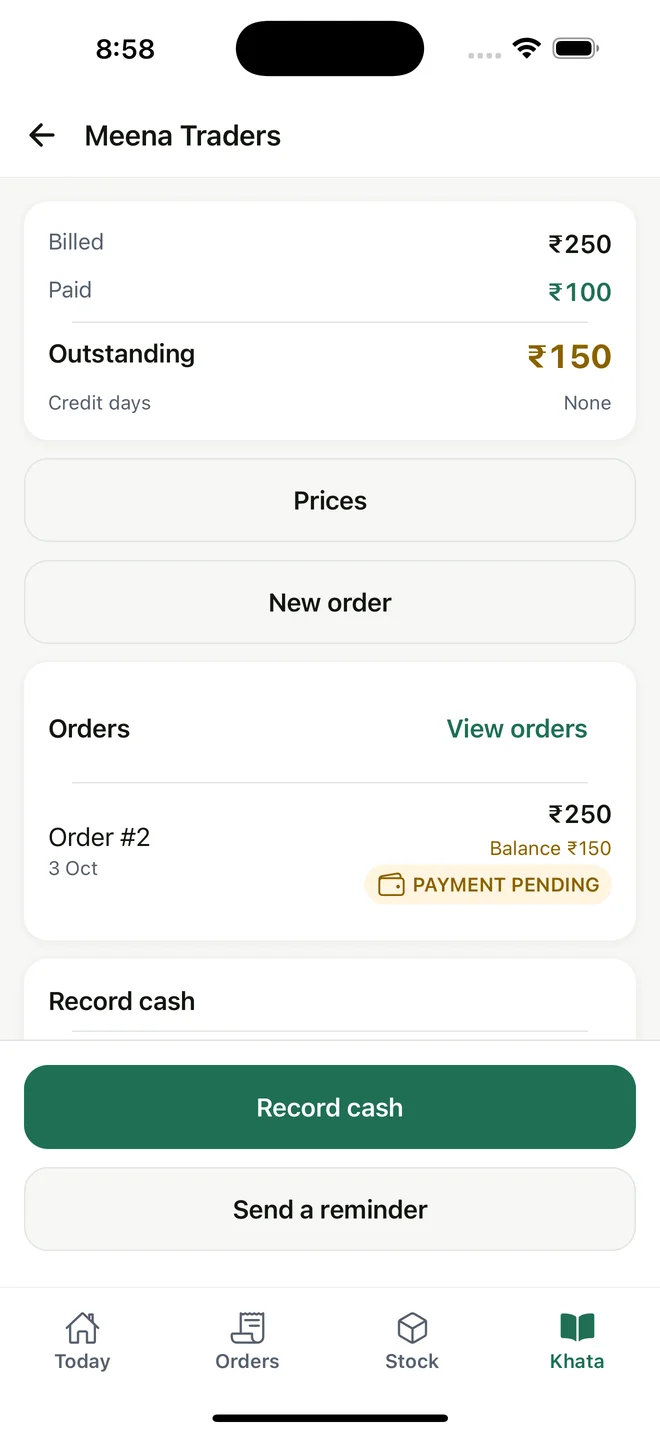
Current regional interface; amounts remain in INR.
01 / THE WORKFLOW
Give every customer a clear account
Open a customer account to review the billed amount, recorded payments and outstanding balance. Go from the account total to individual transactions rather than reconciling separate notes.
02 / THE WORKFLOW
Record what was received
Record a customer payment in full or in part. For example, record cash received against an order and review the remaining amount owed. Current payment methods are Cash and UPI; MyDukaan does not move money, accept cards or verify transfers.
03 / THE WORKFLOW
Keep partial payments in context
Order balances and account credit stay connected. Available account credit covers the oldest eligible orders first, while fulfillment still needs its own recorded steps.
04 / THE WORKFLOW
Give follow-ups a useful starting point
Owners, managers and delivery staff can view customer balances. Review due status and transaction history before contacting a customer. Follow-up is manual; automated reminders are not part of this workflow.
Useful answers
Are payment confirmations tax invoices?
No. A payment receipt confirms a recorded payment. It is not a tax invoice or evidence of country-specific tax compliance.
Can I use multiple currencies?
The current product uses INR and does not support multi-currency transactions. Review the setup guide before evaluating it for an international business.
Keep the workflow connected
Check the fit for your working day.
Review setup, platform access and current international limitations before choosing MyDukaan.
Setup & availability ↗